





Lottery








U9Play App Lottery on u9playapp.com
Start U9Play App Lottery Betting on u9playapp.com
The U9Play App Lottery page on u9playapp.com is designed to help you access lottery games and place bets directly from your mobile device with clear tools and easy navigation. On the lottery interface within the U9Play App, you can view available lottery providers, tap “Play Now” to enter a lottery game, and use built-in features such as Draw Result, Hit Records, Ticket Records, Payout Rate, Lottery Tools, and Site Summary. This helps players track performance, review bet history, and understand payout options before placing a bet, all from the convenience of the U9Play App.
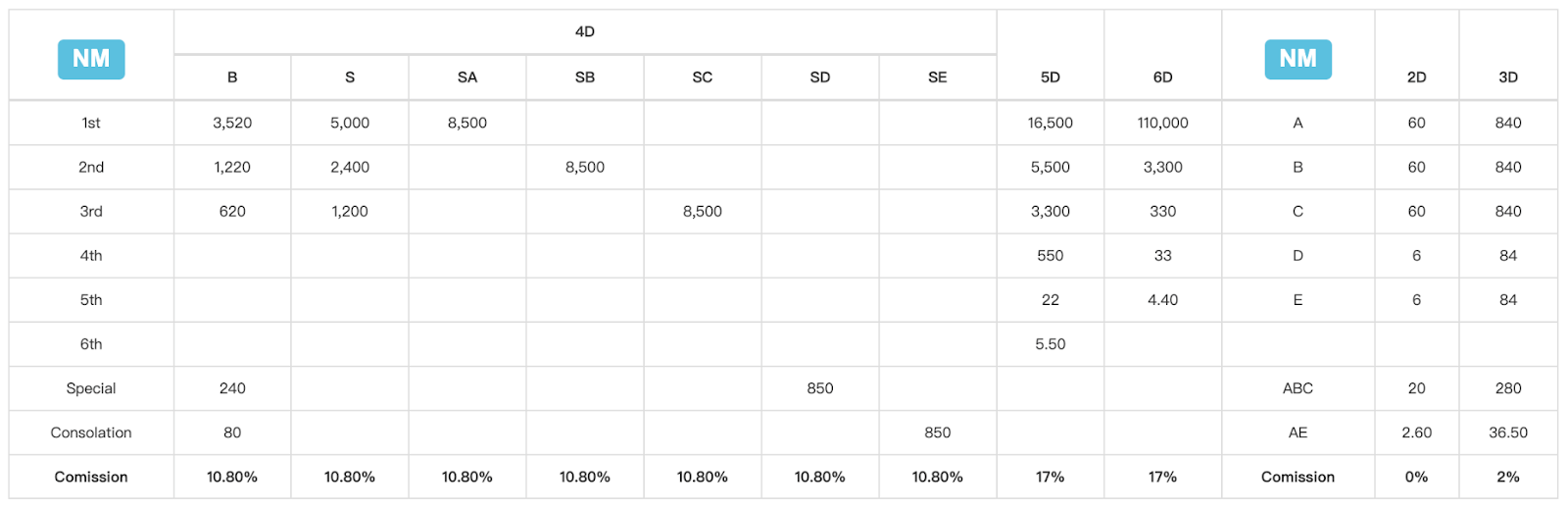
NM Payout Rate Table (4D, 5D, 6D, 2D, 3D) in U9Play App
Understand NM Payouts and Commission Before Betting on Mobile
| NM | 4D (B) | 4D (S) | 4D (SA) | 4D (SB) | 4D (SC) | 4D (SD) | 4D (SE) | 5D | 6D | NM (ABC/E) | 2D | 3D |
|---|---|---|---|---|---|---|---|---|---|---|---|---|
| 1st | 3,520 | 5,000 | 8,500 | — | — | — | — | 16,500 | 110,000 | A | 60 | 840 |
| 2nd | 1,220 | 2,400 | — | 8,500 | — | — | — | 5,500 | 3,300 | B | 60 | 840 |
| 3rd | 620 | 1,200 | — | — | 8,500 | — | — | 3,300 | 330 | C | 60 | 840 |
| 4th | — | — | — | — | — | — | — | 550 | 33 | D | 6 | 84 |
| 5th | — | — | — | — | — | — | — | 22 | 4.4 | E | 6 | 84 |
| 6th | — | — | — | — | — | — | — | — | 5.5 | — | — | — |
| Special | 240 | — | — | — | — | — | — | 850 | — | ABC | 20 | 280 |
| Consolation | 80 | — | — | — | — | — | — | 850 | — | AE | AE | 36.5 |
| Commission | 10.80% | 10.80% | 10.80% | 10.80% | 10.80% | 10.80% | 10.80% | 17% | 17% | Commission | 0% | 2% |
The NM payout rate table, viewable within the U9Play App, helps you understand potential winnings across multiple bet types, including 4D (B, S, SA, SB, SC, SD, SE), 5D, 6D, and side formats like 2D and 3D. It also displays commissions such as 10.80% for most 4D options and 17% for 5D/6D, plus additional commission references for 2D and 3D. Reviewing NM payout rates on your U9Play App helps you estimate returns and choose the right bet type on u9playapp.com.
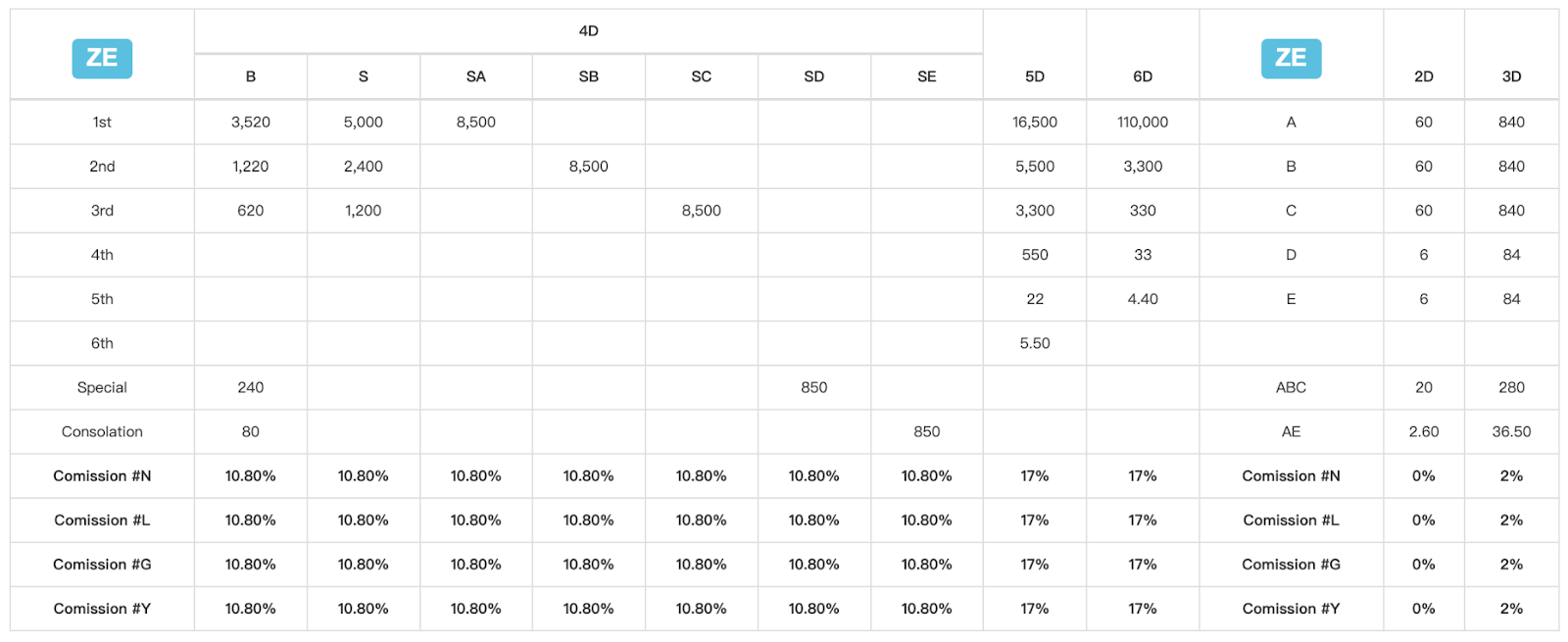
ZE Payout Rate Table (4D, 5D, 6D, 2D, 3D) in U9Play App
Use ZE Payout Details to Plan Your Lottery Strategy on Mobile
| ZE Game Payout Table | 4D (B) | 4D (S) | 4D (SA) | 4D (SB) | 4D (SC) | 4D (SD) | 4D (SE) | 5D | 6D | 2D | 3D |
|---|---|---|---|---|---|---|---|---|---|---|---|
| 1st | 3,520 | 5,000 | 8,500 | — | — | — | — | 16,500 | 110,000 | 60 (A) | 840 (A) |
| 2nd | 1,220 | 2,400 | — | 8,500 | — | — | — | 5,500 | 3,300 | 60 (B) | 840 (B) |
| 3rd | 620 | 1,200 | — | — | 8,500 | — | — | 3,300 | 330 | 60 (C) | 840 (C) |
| 4th | 550 | — | — | — | — | — | — | — | 33 | 6 (D) | 84 (D) |
| 5th | 22 | — | — | — | — | — | — | — | 4.4 | 6 (E) | 84 (E) |
| 6th | 5.5 | — | — | — | — | — | — | — | — | — | — |
| Special | 240 | — | — | — | — | — | — | — | — | 20 (ABC) | 280 (ABC) |
| Consolation | 80 | — | — | — | — | — | — | — | — | 2.60 (AE) | 36.50 (AE) |
| Commission Rates | 4D B | 4D S | 4D SA | 4D SB | 4D SC | 4D SD | 4D SE | 5D | 6D | 2D | 3D |
|---|---|---|---|---|---|---|---|---|---|---|---|
| #N | 10.80% | 10.80% | 10.80% | 10.80% | 10.80% | 10.80% | 10.80% | 17% | 17% | 0% | 2% |
| #L | 10.80% | 10.80% | 10.80% | 10.80% | 10.80% | 10.80% | 10.80% | 17% | 17% | 0% | 2% |
| #G | 10.80% | 10.80% | 10.80% | 10.80% | 10.80% | 10.80% | 10.80% | 17% | 17% | 0% | 2% |
| #Y | 10.80% | 10.80% | 10.80% | 10.80% | 10.80% | 10.80% | 10.80% | 17% | 17% | 0% | 2% |
The ZE payout table, accessible via the U9Play App, provides another reference model for prize values across 4D, 5D, 6D, 2D, and 3D formats. It includes payout amounts for 1st to 6th positions, plus Special and Consolation categories, along with commission rows (such as Commission #N, #L, #G, #Y) to show how payouts may be affected. Checking the ZE payout rate table on your U9Play App helps you compare bet formats and understand expected rewards before you place any ticket.
How to Enter Lottery Games Before Betting on u9playapp.com
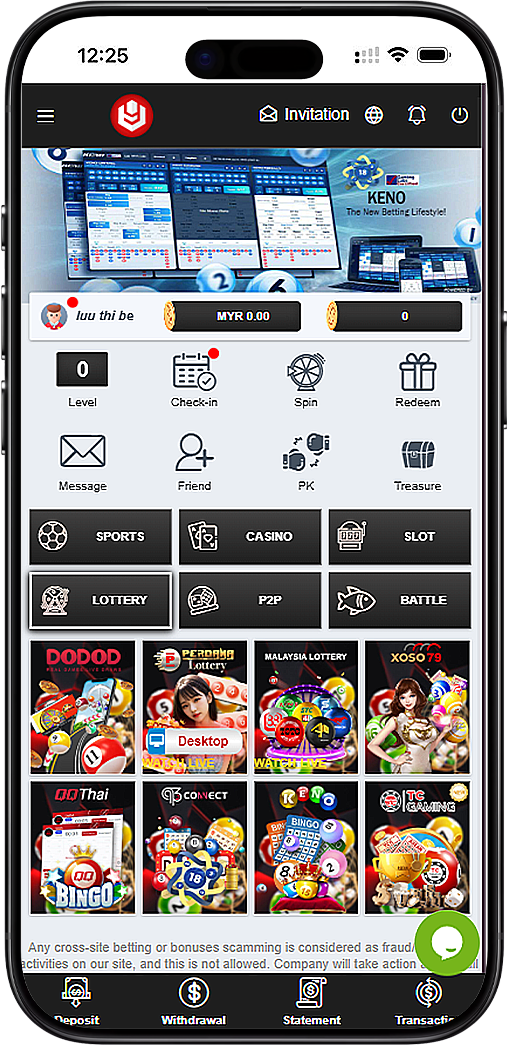
Step 1: Click the "Play Lottery" Button in the App
Before betting on u9playapp.com, open your U9Play App and click on the "Play Lottery" button. This action will bring you to the official U9Play platform within the App where the lottery games are hosted.
Step 2: Select the Lottery Icon on the Official Homepage Inside the App
After you reach the official platform homepage inside your U9Play App, click the lottery icon to enter the lottery section. This is the fastest way to access the full list of available lottery games and providers on mobile.
Step 3: Choose a Lottery and Start Betting (Example: Malaysia Lottery)
Once you are on the lottery games page within the U9Play App, you can randomly select any lottery to begin. In this guide, we use Malaysia Lottery as the example. Click "Play Now" under Malaysia Lottery within the App to open the betting interface and proceed with your bet setup.
About the Lottery Betting Steps in the U9Play App
Step 1: Select Date, Form, and Draw Time on Mobile
In the betting form within the U9Play App, start by selecting the date you want to bet on, then choose the correct form type (such as 4D). Next, choose the draw time option (for example, 3PM or 7PM). This ensures your bet is placed for the correct draw session via the App.
Step 2: Choose a Bet Type (Box, I-Box, Reverse) in the App
Pick your preferred bet type within the U9Play App based on how you want your number to be evaluated. Common options include Box, I-Box, and Reverse. These formats may change the way your chosen numbers are matched against results, so choose the one that fits your betting strategy on mobile.
Step 3: Enter Your Numbers and Add Them to the Bet List in the App
Enter your selected numbers in the input field within the U9Play App, then click the "+" add button to place the number into your betting list. This helps you prepare multiple selections before confirming. If needed, use delete (X) to remove a number before placing the bet in the App.
Step 4: Review Payout Rate and Confirm Your Stake on Mobile
Before placing your bet in the U9Play App, check the payout rate table within the App to understand prize amounts for different positions (1st, 2nd, 3rd, Special, Consolation) and any commission percentages shown. Reviewing this table helps you make informed decisions and manage your budget responsibly on your mobile device.
Step 5: Place Your Bet and Save Your Records in the App
After confirming your entries within the U9Play App, tap the Bet button to submit. You can later check your betting history using Ticket Records or Hit Records, review results under Draw Result, and use Win/Lose Report to track performance over time, all directly from your U9Play App.
Useful Lottery Tools and Features for Better Tracking in the U9Play App
Quick Search, Results, and Bet Management Tools on Mobile
The U9Play App Lottery includes tools that help you manage bets efficiently on your mobile device: Quick Search to find bet details, Cancel BetID for corrections (when available), Draw Result for official outcomes, Hit Records for wins, Ticket Records for history, Payout Rate for prize reference, Lucky Pick Numbers for fast random selection, and Site Summary for overall system information. These features within the U9Play App are useful for both new and experienced players.
Play U9Play App Lottery Now
Access lottery games through u9playapp.com on your mobile, choose Malaysia Lottery or another provider within the U9Play App, follow the betting steps, and place your bet with confidence using built-in tools and results tracking.
Play Lottery Now – Malaysia Play Lottery Now – Singapore