


U9Play App Daily Check-In: Claim Daily Rewards, Track Progress & Reset Time
U9Play App Daily Check-In Overview
What Is the Daily Check-In Feature in the App?
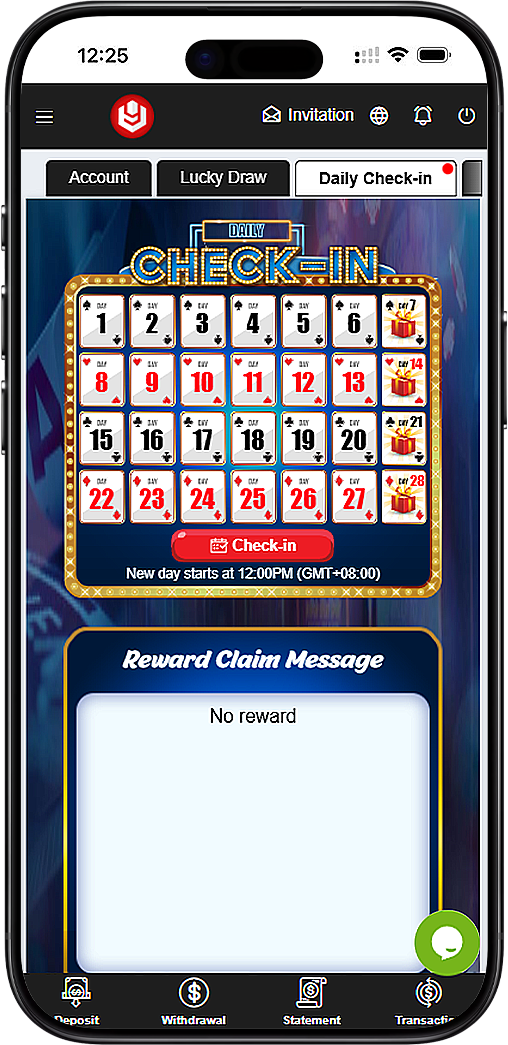
The U9Play App Daily Check-In page is a simple daily rewards program within the mobile app designed to encourage consistent activity. Each day you check in on your device, your calendar progress updates, and eligible rewards can be claimed based on the check-in schedule displayed in the App. This makes it easy to track what day you are on and what rewards you may qualify for directly from your mobile screen.
How the Check-In Calendar Works on Mobile
The check-in calendar in the U9Play App displays a full month view with numbered day tiles (Day 1 to Day 28+) and highlighted reward milestones. Special reward days are marked with gift icons within the App so users can quickly identify upcoming reward checkpoints. You can view your current progress visually on your device without needing to search through menus.
U9Play App Daily Check-In Reset Time (Important)
When Does a New Check-In Day Start in the App?
The U9Play App Daily Check-In page clearly states the reset schedule: New day starts at 12:00PM (GMT+08:00). This means daily check-in eligibility within the App is based on this time, not midnight. To avoid missing your check-in on mobile, it's recommended to check in after the reset time and before the next day's reset using your device.
Why Reset Time Matters for Rewards in the App
Since the reset occurs at 12:00PM GMT+8, checking in too early on the U9Play App may not count for the next day. Understanding the reset helps you plan your routine within the App and maintain continuous check-in progress without interruptions on your mobile device.
U9Play App Daily Check-In Reward Claim Message
Where to See Reward Claim Status on Mobile
The right side of the U9Play App screen shows a Reward Claim Message panel. This area displays your current claim status (for example, "No reward" when no claim is available). It functions as your quick confirmation within the App that your check-in has been accepted and whether a reward is currently ready to claim on your device.
What "No Reward" Usually Means in the App
If the Reward Claim Message in the U9Play App shows "No reward," it typically means either (1) the current check-in day does not include a reward, or (2) you haven't reached a reward milestone day yet on your mobile calendar. Continue checking in daily via the App to reach gift-marked days where rewards may become available.
U9Play App Daily Check-In Steps (Quick Guide)
Step 1 — Open the Daily Check-In Page in the App
Open the U9Play App, go to the Daily Check-In section, and confirm the calendar is displaying the current month's check-in tiles on your device. Review any gift-marked milestone days to see upcoming rewards directly on your mobile screen.
Step 2 — Tap "Check-in" on Your Device
Press the Check-in button within the U9Play App to record today's check-in. Your calendar progress should update on your device, and the Reward Claim Message panel will show whether a reward is available.
Step 3 — Confirm Reward Claim Message in the App
After checking in on the U9Play App, look at the Reward Claim Message panel on your mobile screen. If a reward is eligible, you should see a claimable message. If it shows "No reward" on your device, your check-in still counts and you can continue toward the next milestone day via the App.
U9Play App Daily Check-In Terms & Conditions (Key Rules)
Program Start Period (Dec 2025) as Shown in the App
The U9Play App Daily Check-In program indicates that the reward program period starts from Dec 2025, as displayed on mobile. This establishes the active time period for the check-in rewards system within the App and helps users understand when the program is officially in effect on their device.
Eligibility & Program Changes for App Users
The U9Play App states that the company reserves the right, at any time and without prior notice within the App, to remove or disable eligibility for any user at its sole discretion. This is a standard policy for reward programs accessed via mobile to protect fairness and prevent abuse.
Withdrawal Rolling Requirement (3x Rolling) in the App
If a check-in reward in the U9Play App is credited as a bonus amount, the terms within the App state a 3x rolling requirement to withdraw. This means users may need to meet a betting turnover requirement before eligible bonus-related funds can be withdrawn from their mobile account. Always review the latest terms on the App page for the most accurate requirement.
U9Play App Daily Check-In Best Practices (Helpful Tips)
Set a Daily Reminder Around Reset Time on Your Device
Because the reset happens at 12:00PM GMT+8, users of the U9Play App often benefit from checking in around midday on their mobile. This helps ensure you don't miss a day and keeps your progress consistent through the month within the App.
Track Gift Milestones for Better Planning in the App
Gift-marked milestone days in the U9Play App can help you plan your routine. Staying consistent with daily check-ins on your device increases your chances of reaching reward checkpoints without restarting progress.
U9Play App Daily Check-In FAQ
Can I check in more than once per day in the App?
The Daily Check-In feature in the U9Play App is intended for one check-in per reset cycle. Once checked in on your device, you can confirm status via the Reward Claim Message panel within the App.
Why didn't I receive a reward after checking in on mobile?
Not every day guarantees a reward in the U9Play App. Some rewards may only be available on specific gift-marked milestone days. If the message on your device shows "No reward," continue checking in via the App to reach the next milestone.
Are check-in rewards withdrawable immediately from the App?
Some rewards in the U9Play App may be subject to wagering/rolling requirements. The terms within the App indicate a 3x rolling requirement to withdraw, so it's recommended to review the full conditions on your mobile before planning withdrawals.
Start Your Daily Rewards Routine on U9Play App
Open the U9Play App, check in daily after 12:00PM (GMT+8), track your progress on the calendar on your device, and claim eligible rewards through the Reward Claim Message panel — all inside the U9Play App on u9playapp.com.
Check In Now - Malaysia Check In Now - Singapore